Agent Skill Index
The definitive catalog and guide for AI agent capabilities, tools, and workflows.
Navigate your agent through the directory. Eat skills to grow stronger.
What is an Agent Skill?
Think of an Agent Skill as an instruction manual for your AI assistant. Skills allow the AI to learn new capabilities on the fly when it needs them, like giving a person a recipe card instead of making them memorize an entire cookbook.
Skills are simple text files (called SKILL.md) that teach an AI how to do specific tasks. When you ask the AI to do something, it finds the right skill, reads the instructions, and gets to work.
Faster & Lighter
The AI only loads what it needs, when it needs it. No more 10,000-line prompt bloat.
Portable
Skills work across different AI models and tools. Use the same skill in Cursor, Windsurf, or your custom agent.
Verifiable
Every skill includes clear instructions and examples, making it easy to test and improve.
Magic Moments
Your agent now has that skill. No more pasting 50 lines of prompts in every new chat. It just... knows.
How It Works
Skills load in three stages. This keeps the AI fast: it never loads more than it needs.
Browse
The AI sees a list of available skills, just names and short descriptions. It scans this list to understand what capabilities are available.
Load
When a skill is needed, the AI reads the full instructions from the SKILL.md file. It only loads what's relevant to your current task.
Use
The AI follows the instructions and accesses any helper files: scripts, templates, or reference documents included with the skill.
How to Find Skills
There are three recommended ways to discover and install skills.
SkillsMP Marketplace
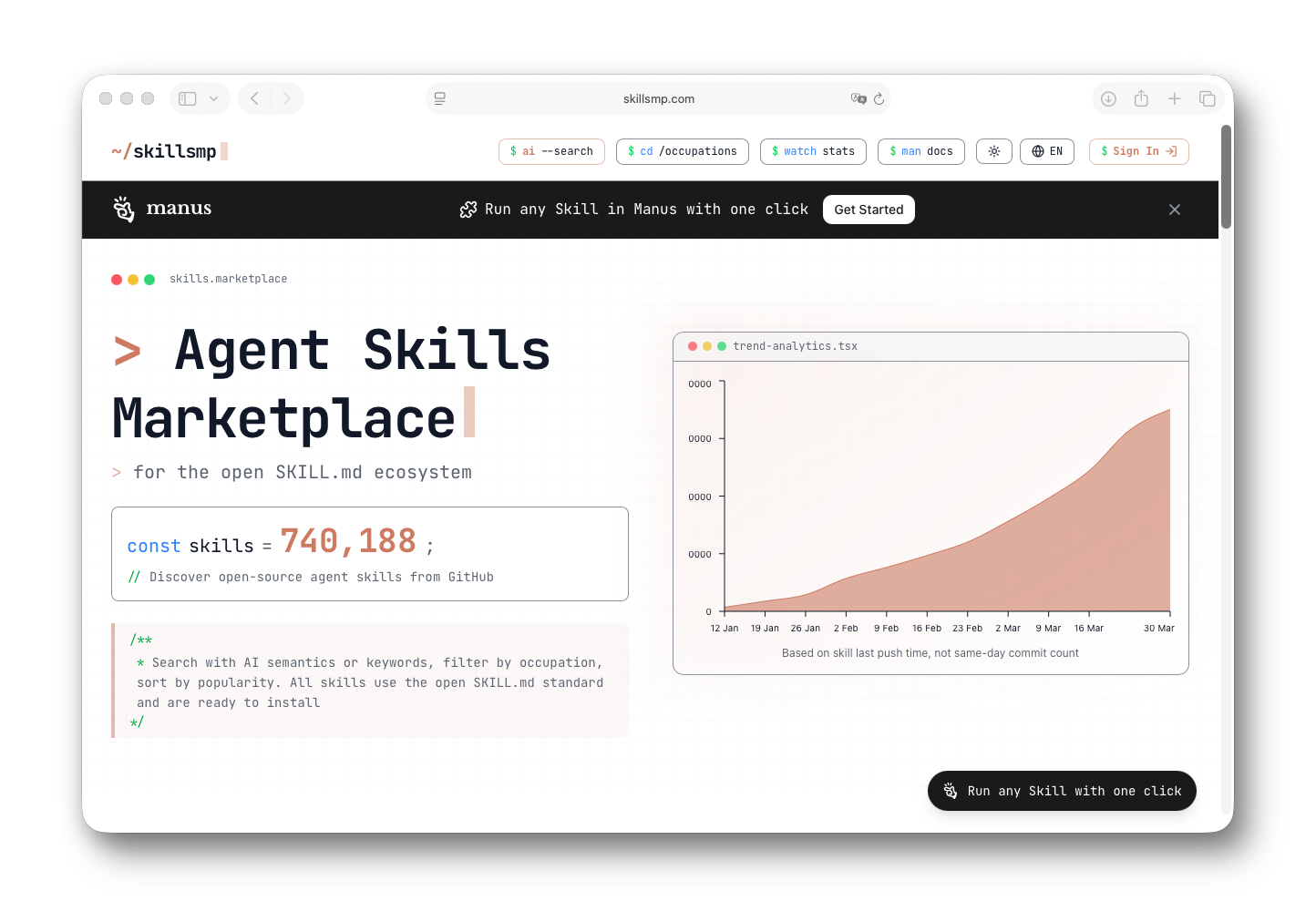
Automatically indexes all Skill projects on GitHub and organizes them by category, update time, star count, and other tags, making it the easiest way to discover and evaluate skills.
skills.sh Leaderboard
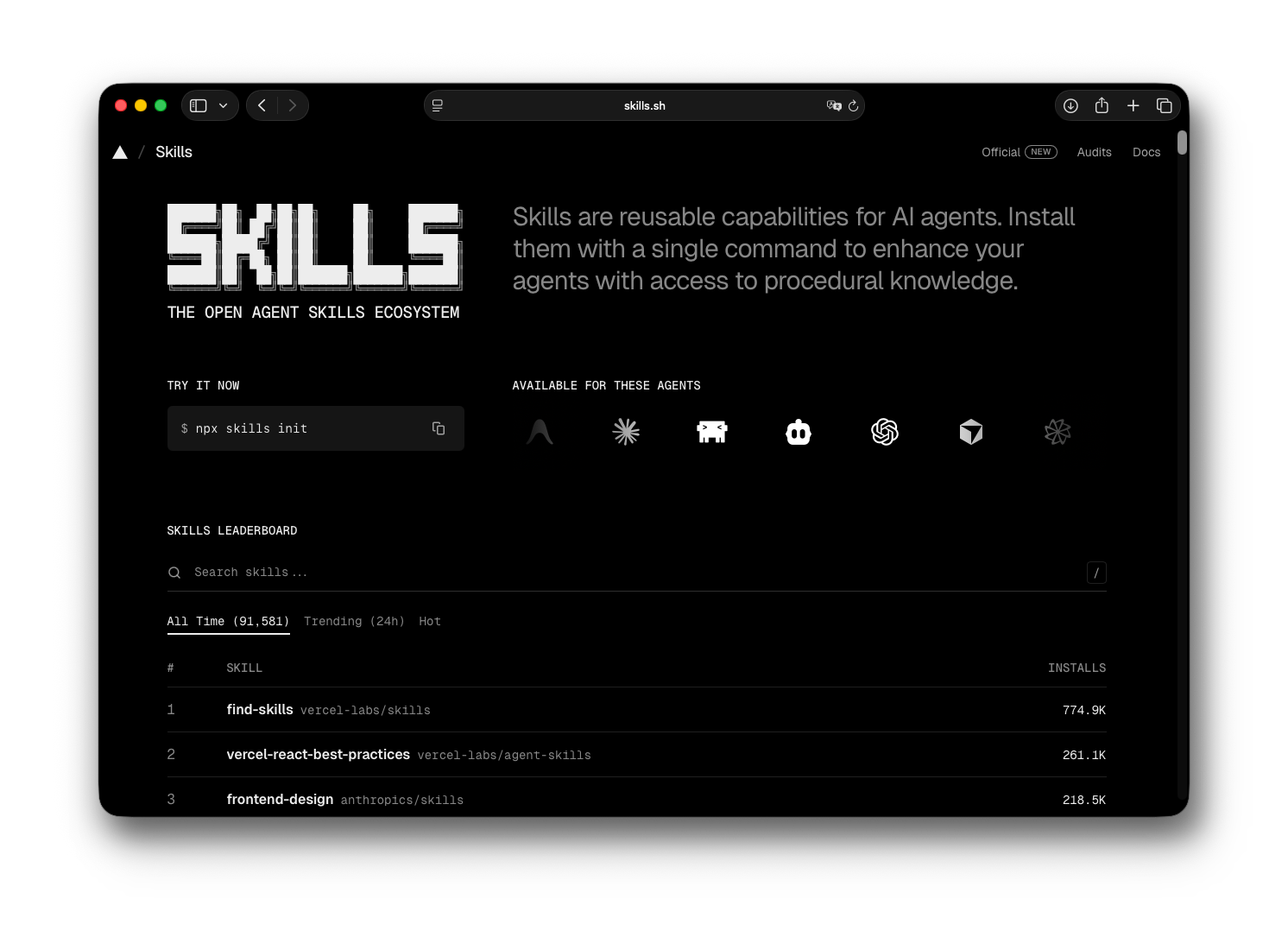
Vercel's leaderboard for intuitively viewing the most popular Skills repositories and individual skill usage statistics.
npx skills CLI Tool
Use the npx skills command-line tool to quickly discover, add, and manage skills directly from your terminal.
npx skills find [query]npx skills add <owner/repo>npx skills listnpx skills checknpx skills updatenpx skills remove [skill-name]Compatible Agents
Agent Skills work across the major AI coding tools and assistants. Click any row to visit the official documentation.
| Agent | Documentation |
|---|---|
| Claude Code | code.claude.com |
| Claude.ai | support.claude.com |
| Codex (OpenAI) | developers.openai.com |
| GitHub Copilot | docs.github.com |
| VS Code | code.visualstudio.com |
| Antigravity | antigravity.google |
| Kiro | kiro.dev |
| Gemini CLI | geminicli.com |
| Junie | junie.jetbrains.com |
Sponsored
Your ad here. Contact haileycheng@proton.me for sponsorship.
Skill Directory
Official and community-maintained capabilities organized by category. Click any card to visit the source.
anthropics/docx
Create, edit, and analyze Word documents with Claude.
anthropics/doc-coauthoring
Collaborative document editing and co-authoring.
anthropics/pptx
Create, edit, and analyze PowerPoint presentations.
anthropics/xlsx
Create, edit, and analyze Excel spreadsheets.
anthropics/pdf
Extract text, create PDFs, and handle forms.
anthropics/algorithmic-art
Create generative art using p5.js with seeded randomness.
anthropics/canvas-design
Design visual art in PNG and PDF formats.
anthropics/frontend-design
Frontend design and UI/UX development tools.
anthropics/webapp-testing
Test local web applications using Playwright natively.
anthropics/mcp-builder
Create MCP servers to integrate external APIs and services.
openai/cloudflare-deploy
Deploy apps to Cloudflare using Workers and Pages.
openai/develop-web-game
Build and test web games iteratively using Playwright.
openai/linear
Manage issues, projects, and team workflows in Linear.
openai/notion-knowledge-capture
Convert conversations into structured Notion wiki entries.
openai/figma-implement-design
Translate Figma designs into production-ready code.
openai/sora
Generate, remix, and manage short video clips via Sora API.
google-gemini/gemini-api-dev
Best practices for developing Gemini-powered apps.
google-gemini/vertex-ai-api-dev
Developing Gemini apps on Google Cloud Vertex AI.
google-gemini/gemini-live-api-dev
Building real-time bidirectional streaming apps.
huggingface/hf-cli
Official Hugging Face CLI tool for Hub operations.
replicate/replicate
Discover and run AI models via API.
fal-ai-community/fal-generate
Generate images and videos using fal.ai.
Quality Standards
Every skill in this directory meets a minimum bar for clarity, precision, and real-world usability.
Clarity & Precision
Instructions must be unambiguous. Avoid 'try to' or 'maybe'. Use direct language like 'Execute' or 'Generate'.
Focused Scope
A good skill does one thing well. Monolithic skills slow down agents and increase token overhead.
Safety & Reliability
Explicitly define error handling and edge cases. A skill should know when to stop and ask for confirmation.
Proven Examples
Include at least two real-world usage examples in SKILL.md to ground the agent in concrete behavior.
"When a PR is opened, scan the `packages/core` directory for changes. If changes exist, run `npm test` and output the results as a summary table."
Clear trigger, specific target, defined output format.
"Try to look at the code if you have time and maybe let me know if anything looks weird or if there are bugs."
No trigger, no target, no success criteria. Prone to hallucination.
Using Skills
Adding a skill takes less than a minute. No config files, no runtime changes.
Step 1: Scuff the Directory
Don't reinvent the wheel! Browse the Directory above. Each skill is just a friendly folder that your AI is literally dying to read.
Step 2: The "Drop-In" Move
Simply hurl that folder into .github/skills/. Modern IDEs like Cursor and Claude Code will sniff it out instantly and go "Oh wow, new knowledge!"
Step 3: Magic Happens
Your agent is now officially "skilled." No more pasting 50-line prompts into every new chat window. It just... knows.
npx skills add anthropics/skills/docx.github/skills/skill-name/Supports GitHub shorthand, full URLs, or local relative paths. Drop-in paths support GitHub shorthand or full URLs.
Creating Skills
A good skill is precise, portable, and testable.
Folder Structure
my-skill/Your invention.SKILL.mdThe brain.scripts/Helper tools.examples/Reference code.SKILL.md Blueprint
Clearly define the scope.
Why does it exist?
Step-by-step logic.
Specific resources needed.
Trends and Capabilities (2026)
The AI agent ecosystem has shifted from chat interfaces to autonomous, goal-driven systems. Here is what defines the landscape today.
Autonomous Execution
Agents complete multi-step goals without human intervention. Expected in 40% of enterprise apps.
Modular Reasoning
Switching between specialized reasoning engines for different task types. Reducing latency by 60%.
Edge Deployment
Running complex agent logic on local devices without cloud dependency. Massive growth in privacy-first apps.
Standardized Protocols
Unified discovery via MCP and similar specs. Interoperability across all major agent frameworks.
Projected Adoption, 2026
FAQ
New to Agent Skills? Here are the most common questions.
Contributing
Help grow the most comprehensive open source collection of AI agent skills.
Submit a skill
Open a pull request with your SKILL.md and any supporting scripts. We review every submission and help refine the instructions.
Report an issue
Found a broken link, outdated resource, or a skill that doesn't work as described? Open an issue directly on GitHub.
Join discussions
Talk about new agentic patterns, trends, and the MCP ecosystem in the GitHub Discussions tab.